
Developers
Keep code snippets and terminal commands close by
Some commands are useful enough to keep, but not frequent enough to memorize. Save them with a clear name, alongside the snippets and review comments you use regularly.
 iPhone · iPad · Vision Pro
Apple Silicon · Intel
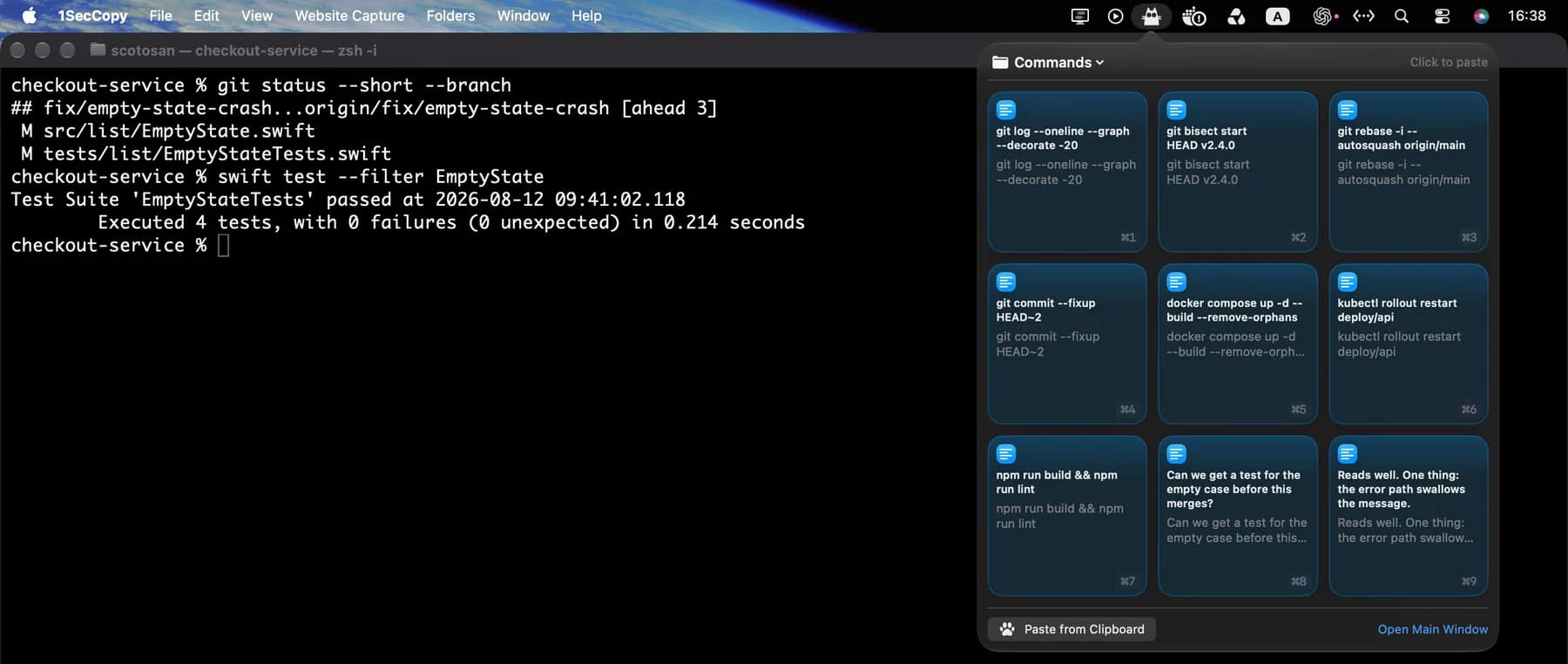
Open the Mac menu bar panel while working in your terminal.
Menu bar
Open the panel. Choose a saved command.
Open the 1SecCopy panel, copy a card and paste into your terminal or editor. With the panel open, ⌘1–⌘9 selects the first nine cards. Enable automatic pasting with Accessibility access if you prefer. Commands are pasted as text; check them before running.
⌘3with the panel open

Paste the saved command, check it and run it when ready.
Commands and comments, named for the task
Keep line breaks, indentation and quoting in the saved text. Review commands for the current project before running them.
Example commands
- ⌘1
git log --oneline --graph --decorate -20 - ⌘2
git bisect start HEAD v2.4.0 - ⌘3
git rebase -i --autosquash origin/main - ⌘4
git commit --fixup HEAD~2 - ⌘5
docker compose up -d --build --remove-orphans - ⌘6
kubectl rollout restart deploy/api - ⌘7
npm run build && npm run lint
Example review comments
- ⌘8
Could we add a test for the empty input before merging?
- ⌘9
The error is caught here, but the caller never receives it. Could we return it?
Library
A folder for each project or task
Keep Git commands, container commands, starter code and commit conventions together. Give cards names that describe when to use them. Search names and contents when you cannot remember the exact command.
A multiline snippet saved as one card
docker compose run --rm api \
  sh -lc 'npm ci \
    && npm run migrate \
    && npm test'
Sync
Bring your snippets to another device
Premium cloud sync keeps saved cards available across your devices. Update a snippet on one Mac and access it from your other devices without copying it into a message to yourself.

Start with the things you use every day
Download 1SecCopy and save a few replies, prompts, images or snippets. Put them in a folder and try using one in your next task.
iPhone · iPad · Vision ProApple Silicon · Intel